How Claude Code works: the complete guide (2026)
Claude Code is an AI coding agent that lives in your terminal. Unlike chatbots where you copy-paste code back and forth, Claude Code operates directly inside your development environment — it reads your files, understands your project structure, writes code, runs tests, handles git workflows, and even submits pull requests. All through natural language commands.
Think of it as having a senior developer sitting beside you who can see your entire codebase, execute commands, and make changes — but you stay in control of what gets approved.
This guide covers everything from installation to advanced features like auto mode, voice control, agent teams, and scheduled tasks with /loop. Whether you’re a beginner or an experienced developer, you’ll understand exactly how Claude Code works by the end.
What is Claude Code?
Claude Code is Anthropic’s command-line AI coding agent. It uses Claude’s language models (Opus 4.6 and Sonnet 4.6 as of March 2026) to understand your codebase and perform development tasks autonomously. It’s not a code completion tool like GitHub Copilot — it’s a full agent that can plan, execute, test, and iterate on complex multi-file changes.
The core difference is agency. Code completion tools suggest the next line. Claude Code understands the entire project and executes complete workflows: “Add a user authentication system with OAuth, write tests, and submit a PR” — and it does all of it.
How Claude Code works: the core loop
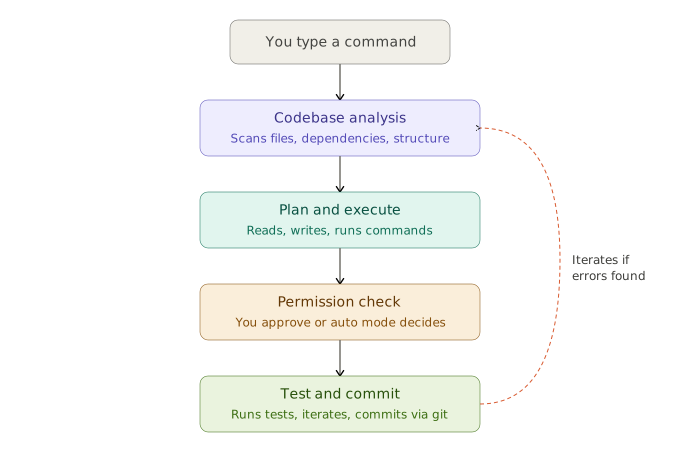
[INFOGRAPHIC: Create a flowchart showing the Claude Code workflow loop]
- Step 1: You type a natural language command in the terminal
- Step 2: Claude Code scans your codebase using agentic search
- Step 3: It creates a plan and starts executing (reading files, writing code, running commands)
- Step 4: It asks for your permission before making changes (unless auto mode is on)
- Step 5: It runs tests, checks for errors, and iterates
- Step 6: You approve, and it commits via git
Every interaction follows this pattern. You describe what you want, Claude Code figures out how to do it, and you approve the changes. The permission system ensures nothing happens to your code without your knowledge.
Installation (all platforms)
Getting Claude Code running takes under 5 minutes. Here are the commands for each platform:
macOS and Linux:
curl -fsSL https://claude.ai/install.sh | bashWindows (PowerShell):
irm https://claude.ai/install.ps1 | iexAlternative (npm — any platform):
npm install -g @anthropic-ai/claude-codeAfter installation, open a new terminal and type claude to start. You’ll be prompted to log in with your Claude account (Pro, Max, Team, or Enterprise) or an Anthropic API key.
Verify installation:
claude --versionThe native installer doesn’t require Node.js — it downloads a self-contained binary. Only the npm method requires Node.js 18+.
Your first session
Navigate to your project folder and launch Claude Code:
cd ~/my-project
claude
You’ll see an interactive prompt where you can type natural language commands. Here are some starter examples:
What does this project do? Explain the main architecture.Add a user settings page where users can update their email and password. Follow the existing patterns in this codebase.Write unit tests for the OrderProcessor class covering success and failure scenarios.Find and fix the bug where the checkout page crashes when the cart is empty.Claude Code reads your files, understands the relationships between them, and executes changes across multiple files simultaneously.
CLAUDE.md — teaching Claude about your project
The single most impactful thing you can do is create a CLAUDE.md file in your project root. This gives Claude persistent context about your codebase that it can’t infer from code alone — build commands, conventions, architecture decisions, and testing instructions.
Generate one automatically:
/initThis analyzes your codebase and creates a starter CLAUDE.md. Here’s an example of what a good one looks like:
markdown
# CLAUDE.md

## Commands
- `npm run dev` - Start dev server on port 3000
- `npm run build` - Production build
- `npm test` - Run Jest tests
- `npm run lint` - ESLint check

## Architecture
- Next.js 15 with App Router
- PostgreSQL with Drizzle ORM
- Authentication via Clerk
- All API routes in src/app/api/

## Conventions
- Server components by default; use "use client" only when needed
- TypeScript strict mode; no any types
- Commit messages: imperative mood, under 72 chars
Keep it concise — aim for 50 to 100 lines. For monorepos, add a CLAUDE.md in each subdirectory. Claude loads them hierarchically.
Key features of Claude Code in 2026
[INFOGRAPHIC: Create a feature map / capability grid showing all 12 features]
- Core: Terminal CLI, Codebase understanding, Multi-file editing, Git integration
- Interfaces: VS Code extension, JetBrains plugin, Web interface, Desktop app
- Advanced: Voice mode, Auto mode, Agent Teams, /loop scheduled tasks, Remote Control, Computer Use
- Configuration: CLAUDE.md, MCP servers, Hooks, Skills
Claude Code has evolved from a simple terminal tool into a full autonomous coding agent platform. Here’s what each major feature does:
Permission modes
Claude Code offers three permission modes that control how much autonomy it has:
Default mode asks for approval on every file write and bash command. Safe but requires constant attention.
Auto mode (launched March 2026) lets Claude make low-risk permission decisions on its own. A dedicated AI safety classifier reviews every tool call before execution, blocking dangerous actions like mass file deletion or sensitive data access. Enable it with:
claude --enable-auto-modeThen cycle to it with Shift+Tab during a session. Auto mode is the recommended middle ground for most development work.
Skip permissions (--dangerously-skip-permissions) bypasses all checks. Only use this in isolated containers or sandboxes — never on a real codebase.
Voice mode
Activated with the /voice command, voice mode uses push-to-talk — hold the spacebar to speak, release to send. It supports 20 languages as of March 2026 and is great for dictating complex requirements or working hands-free.
/voiceThe key is customizable through keybindings.json. Voice mode isn’t “always listening” — it only records while you hold the key, making it precise and privacy-respecting.
Agent teams (research preview)
Agent Teams let you spawn multiple Claude Code instances that collaborate on a task. A team lead coordinates teammates, each working on different parts of the codebase simultaneously. Enable it with:
CLAUDE_CODE_EXPERIMENTAL_AGENT_TEAMS=1 claudeThis is particularly powerful for large refactors or feature implementations that span many files.
/loop — scheduled recurring tasks
The /loop command turns Claude Code into a background worker that runs on a schedule, similar to cron jobs. Use it for automated PR reviews, deployment monitoring, or periodic code quality checks.
This is one of the most practical new features — it transforms Claude Code from an interactive tool into an always-on development assistant.
Remote control
Start Claude Code on your local machine, then control it from anywhere — your phone, tablet, or another computer — through the claude.ai/code web interface or the iOS/Android apps. Your code never leaves your local machine; only chat messages are transmitted through an encrypted channel.
1 million token context window
Available on Max, Team, and Enterprise plans, the 1M token context window lets Claude Code hold your entire codebase in context at once. For large projects, this eliminates the need for repeated context-setting.
Thinking levels
Claude Code supports different “thinking” depths for complex problems:
/effort highFor the deepest reasoning, use “ultrathink” — Claude spends more time planning before acting, producing better results on complex architectural decisions.
MCP (Model Context Protocol) servers
MCP servers extend Claude Code’s capabilities by connecting it to external tools and data sources — GitHub, databases, deployment platforms, monitoring dashboards, and more. Claude Code can then read issues, query databases, check deployment status, and take actions across your entire development stack.
Available interfaces
[INFOGRAPHIC: Show the 4 ways to use Claude Code]
- Terminal CLI: Most features, maximum flexibility
- VS Code extension: Visual diffs alongside your code (also works in Cursor and Windsurf)
- JetBrains plugin: For IntelliJ, WebStorm, RubyMine users
- Web interface: Quick access from any browser, works with GitHub repos
- Desktop app: Skip the terminal entirely (macOS and Windows)
Pricing plans
Claude Code is included in your Claude subscription. Here’s what each plan offers:
Pro ($20/month): Basic Claude Code access. Good for learning and small-to-medium projects. Rate limits apply during heavy use.
Max 5x ($100/month): Approximately 88,000 tokens per 5-hour window. Priority access during peak times. Best for developers using Claude Code regularly.
Max 20x ($200/month): Approximately 220,000 tokens per 5-hour window. Rate limits are rarely a concern. For power users and full-time AI-assisted development.
Team and Enterprise: Higher limits, admin controls, auto mode management, and organization-wide settings.
API (pay-per-use): Direct token billing through the Anthropic Console. Can be cost-efficient for light usage but expensive for heavy daily use.
Common use cases
Here are real workflows where Claude Code excels:
Understanding a new codebase: “Explain this project’s architecture. What are the main modules and how do they interact?”
Feature development: “Add a notification system with email and in-app channels. Follow the existing patterns.”
Bug fixing: “Users report that search results are empty after filtering by date. Find and fix this.”
Refactoring: “Refactor the UserController to use service objects instead of putting business logic in the controller.”
Writing tests: “Write comprehensive unit tests for the payment processing module covering edge cases.”
Git workflows: “Review my changes, create a meaningful commit message, and open a PR.”
Code review: “Review the latest PR and flag any security concerns or performance issues.”
Claude Code vs other AI coding tools
Claude Code vs Cursor: Cursor is an IDE (VS Code fork) with AI built in. Claude Code is an agent that works alongside any IDE. Cursor is better for inline completions; Claude Code is better for complex multi-file changes and autonomous workflows.
Claude Code vs GitHub Copilot: Copilot suggests code as you type. Claude Code executes entire tasks autonomously — reading issues, writing code, running tests, and submitting PRs without you touching the keyboard (in auto mode).
Claude Code vs Gemini CLI: Google’s Gemini CLI is free (1,000 requests/day) and good for lighter tasks. Claude Code with Opus 4.6 produces better results on complex multi-file reasoning tasks and large codebase navigation.
Tips for getting the best results
Getting consistently good output from Claude Code comes down to a few habits. Be specific about what you want — “add authentication” is vague while “add Google OAuth login using the existing Clerk setup, following the pattern in src/auth” gives Claude precise context.
Always create a CLAUDE.md file. Start with /init and refine it over time. The better Claude understands your project conventions, the better its code matches your style.
Use thinking levels for complex decisions. Quick fixes work fine with default effort, but architectural changes benefit from /effort high or ultrathink mode.
Review changes before approving. Even in auto mode, periodically check what Claude has done. The safety classifier catches dangerous actions, but code quality review is still your responsibility.
Break large tasks into smaller ones. “Build an e-commerce platform” will produce mediocre results. “Add the product listing page with filters, using the existing database schema” gives Claude a clear, bounded task.
Frequently asked questions
Is Claude Code free?
No. Claude Code requires a paid Claude subscription (Pro at $20/month minimum) or an Anthropic API key with credits. There’s no free tier, but Google’s Gemini CLI is a free alternative for lighter workloads.
Does Claude Code work on Windows?
Yes. As of 2026, Claude Code has native Windows support through PowerShell. You can also use it through WSL (Windows Subsystem for Linux) or Git Bash.
Can Claude Code access the internet?
Claude Code can run any command-line tool available on your system, including curl, wget, and git. Through MCP servers, it can connect to APIs, databases, and external services. It doesn’t browse the web by default, but it can be configured to access external resources.
Is my code sent to Anthropic’s servers?
Claude Code sends your code context to Anthropic’s API for processing, similar to how any AI coding tool works. For remote control sessions, only chat messages are transmitted — files stay on your local machine. Enterprise plans offer additional data handling controls.
What programming languages does Claude Code support?
Claude Code works with any programming language. It’s particularly strong with Python, JavaScript/TypeScript, Go, Rust, Java, C++, Ruby, PHP, and Swift, but it can handle any language it encounters in your codebase.
What is the CLAUDE.md file?
CLAUDE.md is a markdown file in your project root that gives Claude persistent context about your codebase — build commands, architecture decisions, coding conventions, and testing instructions. It’s the single most impactful optimization for getting better results from Claude Code.
What is auto mode in Claude Code?
Auto mode (launched March 2026) lets Claude approve and execute file edits and bash commands without asking for permission each time. An AI safety classifier monitors every action, blocking dangerous operations like mass file deletion or data exfiltration.
Getting started today
The fastest path from zero to productive with Claude Code:
- Install it:
curl -fsSL https://claude.ai/install.sh | bash - Navigate to your project:
cd ~/my-project - Start Claude Code:
claude - Generate your CLAUDE.md:
/init - Ask your first question: “What does this project do? Explain the architecture.”
- Try a real task: “Write unit tests for the main module.”
From there, explore voice mode (/voice), try auto mode for longer tasks, and connect MCP servers for your development stack. Claude Code is one of those tools where the more you use it, the more you discover what it can do.
Last modified: March 27, 2026