5 AI Prompts for Jaw-Dropping Watch Product Photography (Copy & Paste)
Luxury watch photography used to require a studio, a photographer, and a budget that could buy the watch itself. Not anymore.
With AI image generators like Google AI Studio (Gemini), you can create commercial-grade watch product shots in minutes — no camera, no lighting rig, no retouching. All you need is the right prompt.
Below are 5 tested prompts that produce stunning watch photography across different styles: action, underwater, cosmic, studio, and luxury. Each prompt is ready to copy and paste directly into Google AI Studio or any AI image generator.
What makes a great AI watch photography prompt?
Before diving into the prompts, here’s what separates a mediocre AI product shot from one that looks like a real ad campaign. Your prompt needs to specify five things clearly: the subject and its material details, the environment or scene, the camera angle and composition, the lighting setup, and the mood or atmosphere you want to convey. Miss any of these and the AI fills in the blanks with generic choices.
The prompts below follow this exact structure, which is why they consistently produce professional results.
Prompt 1: Explosion action shot
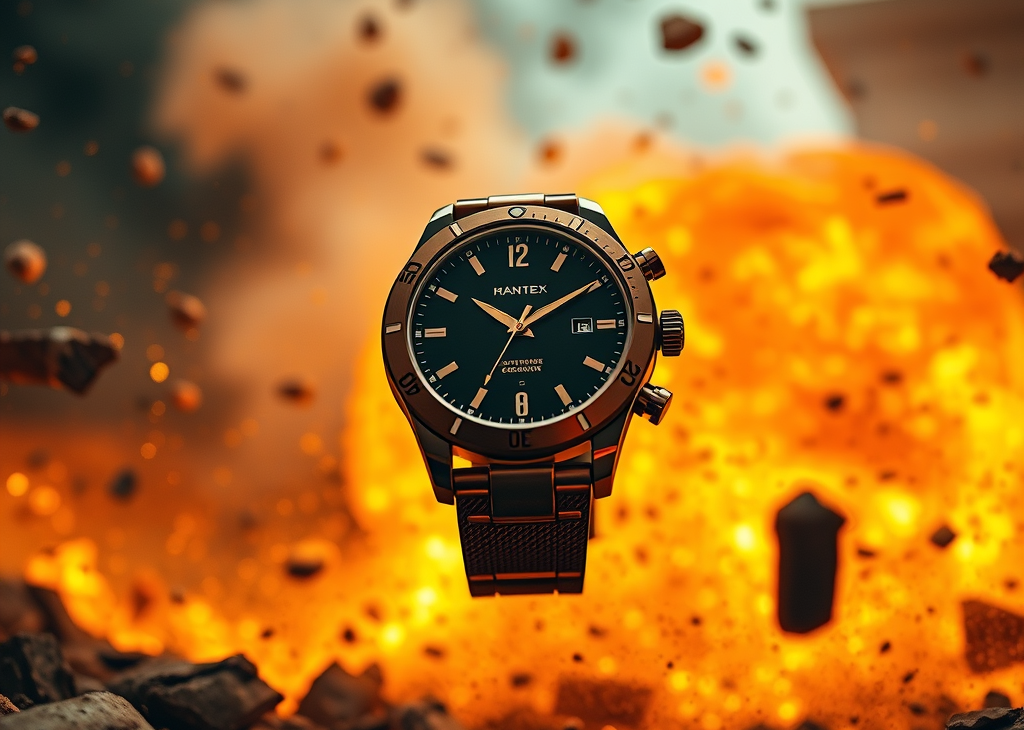
This prompt creates a dramatic, high-energy scene that conveys durability and resilience — perfect for rugged or adventure watch brands.
Best for: Action watches, sports brands, social media ads
A close-up, low-angle shot captures a watch suspended in mid-air amidst an explosion. The watch, a metallic brown with a dark face, is positioned slightly off-center to the right, with its band extending downwards. The explosion behind it is a chaotic blend of fiery orange and yellow light, with debris and smoke filling the background. Rocks and fragments of various sizes are scattered around the watch, some appearing to be in motion, adding to the dynamic and destructive atmosphere of the scene. The lighting is dramatic, with the bright explosion illuminating the watch and casting shadows, creating a sense of intense action and resilience.Why it works: The low-angle perspective makes the watch look powerful and dominant. The explosion backdrop creates visual tension that grabs attention on social media feeds. The specific mention of “metallic brown with a dark face” gives the AI a clear material reference to work with.
Customization tips: Replace “metallic brown” with your watch color (silver, gold, black). Swap “explosion” with “avalanche,” “sandstorm,” or “lightning strike” for different action vibes.
Prompt 2: Underwater deep sea shot
This one places the watch in an underwater coral reef scene — ideal for dive watches or waterproof product marketing.
Best for: Dive watches, waterproof products, lifestyle brands
A watch with a black dial is submerged underwater, surrounded by coral and seaweed. The light filters down from the surface, creating a shimmering effect on the water and illuminating the watch. The composition is centered on the watch, with the natural elements framing it.Why it works: The underwater setting instantly communicates water resistance without saying the words. Natural light filtering from above creates beautiful caustic patterns that add realism. Coral and seaweed framing the watch adds organic texture that contrasts beautifully with the metallic surface.
Customization tips: Add “tropical fish swimming in the background” for more life. Specify “deep ocean blue tones” or “turquoise shallow water” to control the color mood. Mention “bubbles rising from the watch” for extra realism.
Prompt 3: Milky Way galaxy night shot
A dramatic night sky composition that positions the watch against the cosmos — great for premium or aspirational branding.
Best for: Luxury watches, premium brands, editorial content
A close-up, low-angle shot features a black-faced band resting on rough, dark rocks. Behind the watch, the night sky is visible, with the Milky Way galaxy stretching across the frame and numerous stars twinkling. The horizon line, where the sky meets the distant landscape, shows a faint glow of sunset or sunrise. The lighting is dramatic, with the watch illuminated from the front and the background softly lit by the celestial display.Why it works: The contrast between the rugged rock foreground and the infinite galaxy background creates a powerful visual metaphor: precision engineering meets the vastness of nature. The sunset/sunrise glow on the horizon adds warmth and depth to an otherwise cold scene.
Customization tips: Replace “Milky Way” with “northern lights” or “meteor shower” for seasonal variations. Add “reflection of stars on the watch crystal” for extra detail. Specify “warm amber front lighting” or “cool blue moonlight” to shift the mood.
Prompt 4: Premium studio driftwood shot
A classic luxury product photography setup — the watch on natural driftwood with premium studio lighting. This is the closest to what a real commercial shoot would produce.
Best for: E-commerce product pages, brand websites, print ads
Studio product photography of an elegant product replacing the watch, placed on a rugged, textured driftwood sculpture. Background is a smooth, dark chocolate-brown gradient with soft fall-off lighting. The product is centered, hero-style, with dramatic spotlight from above creating subtle highlights and deep shadows.

Lighting: premium studio lighting, crisp reflections, soft rim light, rich contrast, glossy highlights.
Mood: luxury, masculine, earthy, sophisticated.
Foreground: natural driftwood base with rich organic texture, high detail, matte finish.
Composition: product perfectly balanced on the driftwood peak, clean minimal layout, negative space around.
Typography area should be clean and unobstructed.
Style: ultra-realistic, high-end commercial watch advertisement, premium color grading, 8K detail, sharp focus.
Why it works: This prompt is structured like a real creative brief with separate sections for lighting, mood, foreground, and composition. The “typography area should be clean and unobstructed” instruction is a smart addition — it leaves space for adding text in post-production, making the image immediately usable for ads.
Customization tips: Swap “driftwood” with “marble slab,” “raw concrete block,” or “polished obsidian” for different textures. Change “chocolate-brown gradient” to “deep navy” or “charcoal black” for cooler tones.
Pro tip: If you’re using Google AI Studio with image references, add @img1 at the end and upload your actual watch photo. The AI will integrate your real product into the scene.
Prompt 5: Gold dust luxury flat lay
A top-down luxury composition with dark rocks and gold dust — moody, atmospheric, and perfect for premium social media content.
Best for: Instagram posts, luxury branding, dark-mode aesthetics
A top-down shot features a watch with black accents, placed centrally on a bed of dark, rough-textured rocks. The rocks are interspersed with shimmering gold dust, creating a dramatic and luxurious contrast. The lighting is moody and atmospheric, with subtle smoke or mist effects adding to the overall dramatic composition.Why it works: The top-down angle is the classic flat lay composition that performs extremely well on Instagram. Gold dust against dark rocks creates a luxury palette without any other props needed. The smoke/mist adds atmosphere and makes the image feel more cinematic than a standard product photo.
Customization tips: Replace “gold dust” with “rose gold flakes,” “silver particles,” or “crushed gemstone dust” for color variations. Add “single spotlight from the top left” for more directional drama. Try “volcanic black sand” instead of rocks for a smoother texture.
How to use these prompts
These prompts work best with Google AI Studio (Gemini), but you can also use them in Midjourney, DALL-E, or Stable Diffusion with minor adjustments.
For Google AI Studio specifically, open aistudio.google.com, select an image generation model, paste the prompt, and generate. If you want to use your own watch product image, upload it and add @img1 at the end of the prompt — the AI will integrate your real product into the generated scene.
For Midjourney, add --ar 4:5 --v 6 --style raw at the end. For DALL-E through ChatGPT, paste the prompt as-is. For Stable Diffusion via ComfyUI, use these as the positive prompt and add “blurry, low quality, distorted” as the negative prompt.
Tips for better AI watch photography
Getting consistently great results from AI product photography comes down to a few principles. Always specify the watch material (stainless steel, titanium, ceramic, gold) because it dramatically affects how the AI renders reflections and highlights. Mention the dial color explicitly — “black sunburst dial” produces very different results from just “black dial.”
Include camera terminology in your prompts. Phrases like “shot on Hasselblad H6D,” “85mm f/1.4,” or “macro lens detail” push the AI toward photorealistic rendering. Finally, describe the lighting direction, not just the type — “spotlight from upper right” gives the AI much more precise information than just “dramatic lighting.”
Frequently asked questions
Can I use AI-generated watch photos commercially?
Images generated through Google AI Studio, Midjourney, and DALL-E are generally cleared for commercial use under their respective terms of service. However, if your AI-generated image closely resembles a specific real watch brand’s trademarked design, exercise caution. These prompts create generic watch designs, not replicas of existing brands.
Which AI tool produces the best watch product photos?
As of 2026, Google AI Studio (Gemini) produces the most photorealistic product shots, especially when you upload a reference image. Midjourney v6 excels at artistic and atmospheric compositions. DALL-E 3 is the most accessible option through ChatGPT.
Can I use my own watch photo with these prompts?
Yes. In Google AI Studio, upload your product image and add @img1 at the end of the prompt. The AI will place your real watch into the generated scene while matching lighting and reflections. Prompt 4 (the driftwood studio shot) already includes this instruction.
Do I need to edit the AI images afterward?
For social media content, the raw AI output is usually good enough. For e-commerce product pages or print ads, minor touch-ups in Photoshop or Canva (color correction, sharpening, adding your logo) will make the images look fully professional.
AI generated watch images AI watch photography prompts Google AI Studio prompts I product photography prompts product photography with AI watch product shots AI
Last modified: March 27, 2026